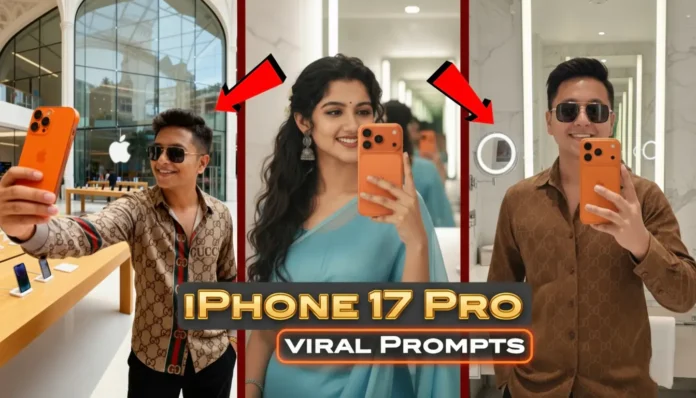
If you’ve been active on Instagram or YouTube Shorts lately, you’ve probably seen people flexing their selfies with the brand-new iPhone 17 Pro in Sunset Orange (also called the Amber Orange Edition or Burnt Orange Variant). The shots look so real you’d think they actually bought the phone. But here’s the twist – most of those viral selfies weren’t taken with the device at all. They were created using Google Gemini text prompts. 🚀At Technical Masterminds, we’ve been following this viral trend that’s taking over Instagram Reels. With just the right AI prompt, you can transform your regular selfie into a premium-looking portrait featuring the sleek iPhone 17 Pro Max Sunset Orange. The results? Hyper-realistic, glossy, and attention-grabbing.In this guide, you’ll find:
– 📋 Ready-to-use Google Gemini prompts
– 🎨 Creative variations (outfits, backgrounds, poses, moods)
– 📱 A bonus tip to turn your AI selfies into short videos using Picsverse
🔥 Why iPhone 17 Pro Orange Selfies Are Trending
The iPhone 17 Pro Sunset Orange Edition stands out with its unique, bold finish. But since only a handful of people actually own it, creators have been using Gemini to fake it. With a few words, you can get a selfie that looks just like an Apple campaign photo, complete with glossy finishes and cinematic backgrounds. The trend is skyrocketing because it makes content look futuristic and stylish—boosting likes, comments, and followers. 😉
⚡ How to Use Google Gemini Prompts
It’s super simple:
1. Take a clear selfie with good lighting 🌞
2. Copy one of the prompts below
3. Paste it into Gemini and generate
4. Save your AI masterpiece and post it 🚀
🟡 Viral iPhone 17 Pro Selfie Prompts
🟢 Prompt 1 – Premium Bathroom Mirror Shot
📋 Click inside the box to copy this prompt
Generate this updated selfie into a premium-looking bathroom selfie. The bathroom should appear contemporary with polished tiles, good lighting, and a mirror in the background. The person must be holding the iPhone 17 Pro Max Sunset Orange Edition. Realistic portrait, making the phone stand out as reflective, bold, and high-end. The selfie should have natural blur with a touch of elegance, keeping the focus on the person and the iPhone while the background remains non-distracting.
🟢 Prompt 2 – Stylish Outfit Upgrade
📋 Click inside the box to copy this prompt
Create a hyper-realistic selfie using the given face. Keep the person holding the iPhone 17 Pro Amber Orange Edition but update the outfit to a trendy streetwear style. A clean oversized hoodie with fresh sneakers, casual jeans, and minimal accessories. Lighting should feel soft and natural, keeping the outfit and iPhone as the highlights.
🟢 Prompt 3 – Rooftop Cityscape at Sunset
📋 Click inside the box to copy this prompt
Transform the selfie into a rooftop cityscape scene during golden hour. Keep the same face but place the person against a modern skyline. The person should be holding the iPhone 17 Pro Burnt Orange Variant with the city lights starting to glow in the background. Use warm sunlight tones to enhance realism and cinematic vibes.
🟢 Prompt 4 – Creative Mirror Pose
📋 Click inside the box to copy this prompt
Update the selfie into a stylish mirror pose. The person should be standing sideways, slightly leaning forward, and holding the iPhone 17 Pro Sunset Orange Edition to the side. Add a minimalist, modern bedroom background with neutral tones. Soft lighting should emphasize the phone’s reflective glass and elegant curves.
🟢 Prompt 5 – Luxury Lounge Aesthetic
📋 Click inside the box to copy this prompt
Create a cinematic selfie where the person is seated in a luxury lounge. Keep them holding the iPhone 17 Pro Max Amber Orange Edition. Add golden chandeliers and a glass table with subtle reflections. The photo should look premium, glamorous, and perfect for Instagram Reels.
💡 Pro Tips for Realistic AI Selfies
Always start with a high-quality selfie (no blurry pics 🚫).
Use natural light for your base image to improve AI results.
Experiment with multiple prompts for variety on your feed.
Add different vibes: urban, luxury, or casual, depending on your audience.
✨ Final Thoughts
The iPhone 17 Pro Sunset Orange selfies trend is just heating up. With these Google Gemini prompts, you can transform your selfies into high-end shots that look like they were taken with Apple’s latest flagship. From bathroom chic to rooftop glam, you now have the prompts to wow your followers. And if you want to push your creativity even further, convert them into short videos for Reels or TikTok using Picsverse. 🎥